 We sopmetimes hear from customers that they are getting a hard shadow to one side of their passport photos. The subject standing too close to the backdrop sometimes causes this, but in most cases it seems to be insufficient lighting – especially under some fluorescent bulbs. Most point and shoot digital camera flashes are small and can do the job in well-lit areas, but they do have their limits.
Increasing the camera's exposure is the first thing to try. You may need test different exposure settings: start with +0.50 and go all the way up to the +2.00 exposure setting. However, sometimes that can be too much - it is possible that the skin tones may wash out or become way too light.
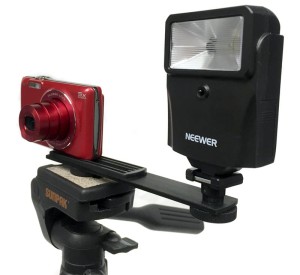
The best way to add more light is to add a Slave Flash. For the pros, there are some really high end (and expensive options), however we have found that some smaller slave lights for digital cameras work great. Our flash has an optic sensor on it that detects when your camera’s flash fires and it triggers the slave flash to simultaneously fire as well. It’s super simple and there are no cables to hook up and nothing to sync! It includes a bracket arm to mount it to your tripod while continuing to steady your camera and it simply runs off 2 AA batteries.
To see how it works, click to watch the video below. If you have any questions, please ask them in the comments below – we’d love to be of help.
https://www.youtube.com/watch?v=fBTIqXbNyrE