
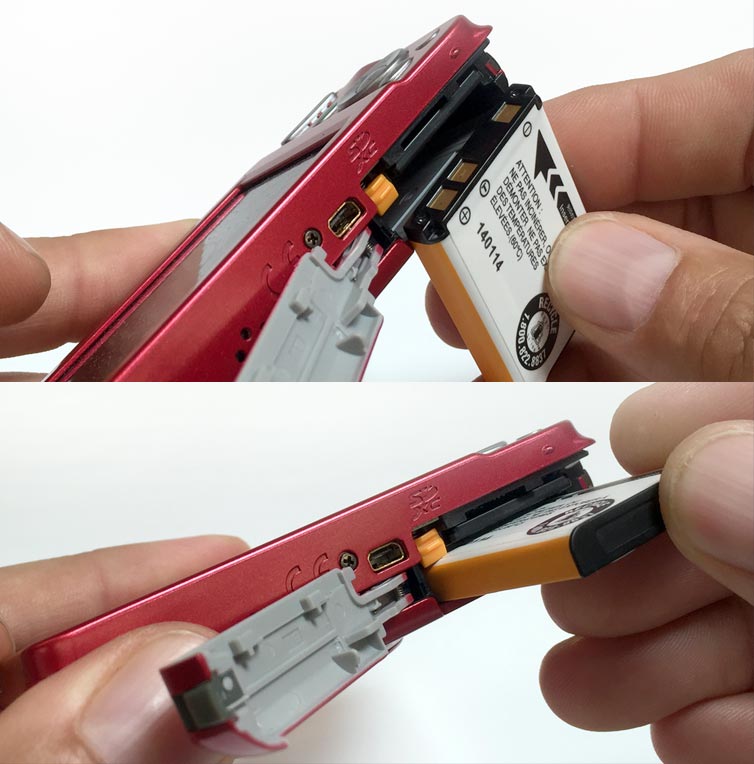
 It's a common issue that we hear a few times a month: someone with a Fujifilm JX series digital passport camera cannot get it to hold a charge. In most of these cases the fix is extremely simple - the rechargeable battery is inserted incorrectly. While the slim battery is directional, with rounded/curved edges on the end that slides into the camera, it is unfortunately very easy to insert it in the wrong direction.
The key to getting the battery inserted right lies in the color orange. The locking release tab for the battery is orange and it just so happens that there is a stripe on the battery edge that is the same color. Simply align the orange stripe with the orange tab and you are good to go. Just make sure you are inserting the battery end with the gold contacts first, facing down into the camera. Click the picture in the above right to see a larger view of the proper battery direction.
If you know that you have the battery inserted in the correct direction and it still does not charge, then contact CFS for technical support and we will do our best to help you.
Got any questions on passport cameras or taking passport photos? Ask away in the comments below.